
7 min reading · 2–4 min exploring
What does a JEP jellyfish call mean?
Read the conditions behind the call.
Jellyfish Exposure Potential · a viewing guide
JEP stands for Jellyfish Exposure Potential. It is T-Minus Zero’s call on whether a sunlit rocket plume can be seen from a particular place: Likely, Possible or Not expected, with one line that names the main reason. Read it with the launch time, the place and the confidence label.
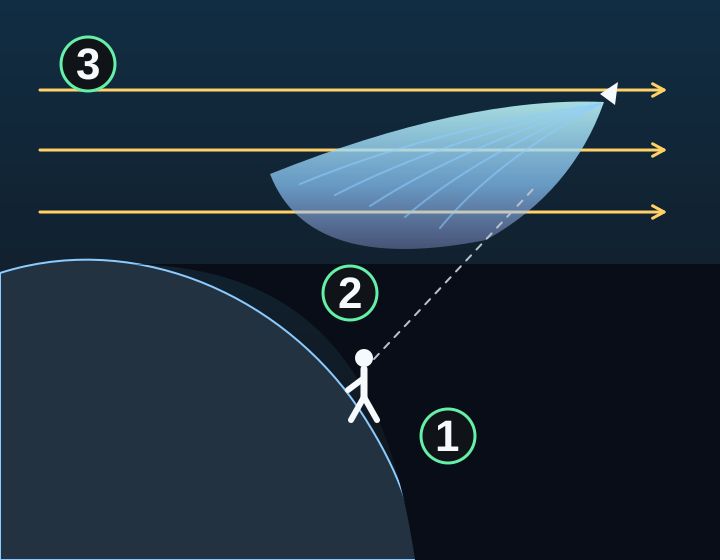
Side-view diagram, not to scale. Sunlight travels from left to right above the curved ground. An observer is in shadow on the right. A rocket’s expanding plume is above that shadow and receives sunlight. The small rocket sits at the narrow end of the plume.
1 · An observer stands on the dark side of the curved ground.
2 · High exhaust catches the sunlight and spreads out.
3 · Sunlight travels past the ground’s shadow to the plume.
Likely, Possible or Not expected
Likely means the conditions for a jellyfish plume line up at the stated place and launch time: the high exhaust is in direct sunlight, the sky behind it is dark enough, the sunlit plume climbs above the horizon, and the cloud forecast does not get in the way.
Possible means part of that chain works but something limits the view, such as thin cloud, a path that stays low, or a sky that is only partly dark. Not expected means a broad sunlit plume is not expected from that place. The rocket itself may still be visible as a moving point.
A call is not a percent chance of seeing a plume. It also says nothing about the chance of launch or the success of the mission.
What the call combines
The right conditions need to happen together. A sunlit plume does not help if it is below your horizon. A dark sky does not help if the plume is already in Earth’s shadow. The model checks those relationships at the same moments along the estimated flight path.
Weather can lower the call. Where forecasts are available, the calculation considers cloud and visibility around the viewpoint. It cannot see every cloud between you and the rocket. If weather information is missing, the call uses the lighting and flight path alone, the reason line can say “Cloud forecast not in yet,” and confidence is lower. Check whether weather was included before comparing calls.
The reason line
Each call comes with one line about the view. It names the condition that decides the call, for example “Good chance to see it from here,” “Clouds may dim it from here,” “The plume stays in Earth’s shadow,” “The sky is too bright here” or “Too low on the horizon from here.”
Teaching example: imagine a launch page that says “Jellyfish launch: Likely” with the reason “Good chance to see it at the launch site,” the viewpoint “Launch-area reference” and “Confidence: Medium.” Launch time used: October 5, 2026, at 9:00 p.m. U.S. Eastern Time. Result updated: October 5, 2026, at 8:42 p.m. U.S. Eastern Time. These are fictional values, not a forecast for a real launch.
The modeled conditions line up well at the stated place and launch time. But the place is the launch area, not your home. Medium confidence means there are still limits in the information behind the call. A cloud, a blocked horizon or a faint plume could still spoil the view.
A call belongs to a place
“Launch-area reference” means the result uses the launch origin as its viewpoint. That may come from the mission’s coordinates or its launch-site record. It does not describe every place near the launch, and it does not mean the app knows where you are.
On the website, “Use my location” asks for location access so the call can use your area. An existing permission may be reused. While that result is being prepared, the launch-area reference can remain on screen. Check the viewpoint label before treating the call as personal.
Buildings, trees and small local differences in the weather can still block your view. You can read this guide and use the fictional example without sharing your location.
Confidence describes the information
The call and its confidence answer different questions. The call describes the expected view. Confidence describes the information used to make it: how precise the launch time is, how well the flight path is known and how fresh the weather forecast is.
High, Medium and Low are summary labels based on those inputs. They are not measured percentages of accuracy. If different launch times within the window would change the call, the timing comparison shows how it could shift.
Why the call changes
A delay can move the plume into or out of sunlight. When a mission has a launch window, the model samples possible times within it and combines their results, along with any modeled paths, using a weighted average. The call is not simply the best moment in the window. A timing comparison holds the saved weather forecast and estimated path fixed while changing the launch time.
Not expected is a calculated call: the modeled conditions do not support a broad sunlit plume. “Cannot assess yet” or “A current result is not available” means there is no usable current calculation, and “Waiting on launch time” means the liftoff time is not yet set to the hour or minute. Neither one means Not expected.
“Loading,” “Updating” or a message about preparing your location means the result is not ready. After a change to the launch time, wait for an updated call and check its timestamp. An old saved call should not be read as a fresh forecast. After a completed flight, a dated result may be kept as a historical snapshot.
Which part of the flight does it cover?
JEP focuses on the plume during ascent. The calculation starts about a minute after liftoff and follows the available flight path through the relevant engine-powered climb. Its end depends on the mission and the information available.
It does not predict the plume’s exact brightness, color or shape, or how a photograph will look. Later spirals from an upper stage and unusual clouds that form much later are different phenomena. A Not expected call does not mean the rocket itself will be invisible.
Where to find JEP
In the app, open a launch and look in “Your View” for its jellyfish call when available. To return to this explanation, open More, then Info, then the JEP guide. You can also find it through Docs.
On the website, look for the jellyfish panel on the mission’s launch page. That is where you can request a call for your location. The guide and the call are free; some enhanced weather tools elsewhere have separate Premium access.
How the picture connects to the call
The observer at 1 is in darkness. The high exhaust at 2 receives sunlight. The light at 3 passes above the curved ground. The observer also needs a clear enough view of the plume above the horizon.
Those conditions need to overlap during the flight. Darkness at one time and sunlight on the plume at an unrelated time are not enough. The drawing makes that relationship easier to see; it does not show the scale or path of a particular launch.
Follow the idea
1. Start with the place
Check whether the result describes your area or the launch-area reference.
2. Check the overlap
The plume needs direct sunlight, a dark enough observer sky and an above-horizon path at the same moments.
3. Read the call with its reason
Read the call, its reason line, confidence, launch time and status together. Likely describes conditions that line up, not a guaranteed sighting.
Try it for yourself
Think it through, then open the answer.
Our fictional launch-area call is Likely, with Medium confidence. Does that mean you are certain to see a jellyfish plume?
Read the answer
No. It means the modeled conditions line up at the stated place and time. It is not a percent chance, Medium confidence says the information behind it still has limits, and your own viewpoint may be different.
The launch slips, and the old panel now says Updating. Is the old call a current answer?
Read the answer
No. Wait for a refreshed result using the new launch time. Not expected would be a calculated call; Updating means the current result is not ready.
Three things to remember
- JEP answers Likely, Possible or Not expected, with one reason line. It is not a percent chance of seeing a plume.
- Read the place, launch time, weather basis, confidence and update state together.
- Not expected is a calculated call; Cannot assess yet and Updating mean there is no current call.
Explore in T-Minus Zero
Understand the expanding plume, sunlight, viewpoint and camera differences.
Pick a mission and read its current time and status.